




Summary
- Access
- API – essential definitions
- Environments
- Workflows, Stages and Best Practices
- Restrict API access to your endpoints (backend) to platform IPs only
- Security Interceptor Documentation
- Traffic interceptors that are important for mitigating DDoS attacks etc.
- Connectors
Access
In API Manager you can create your APIs, Apps, Plans, etc.
https://unicamp.signin.platform-production.sensedia.com/
Note : ⚡ Click the Unicamp button at the bottom of the page.
If this is your first time accessing the system, you must first log in to the Manager (using your "@unicamp.br" account).
Then use this form from the DETIC Service Catalog to request your membership in a team and for us to grant access permissions to your user.
- Ask the developers on your team to also log in for the first time. You should indicate their usernames on the form for the same reasons mentioned above..
The use of this platform is conditional upon the user following the guidelines of Normative Instruction ConTIC IN-01/2019.
API – essential definitions
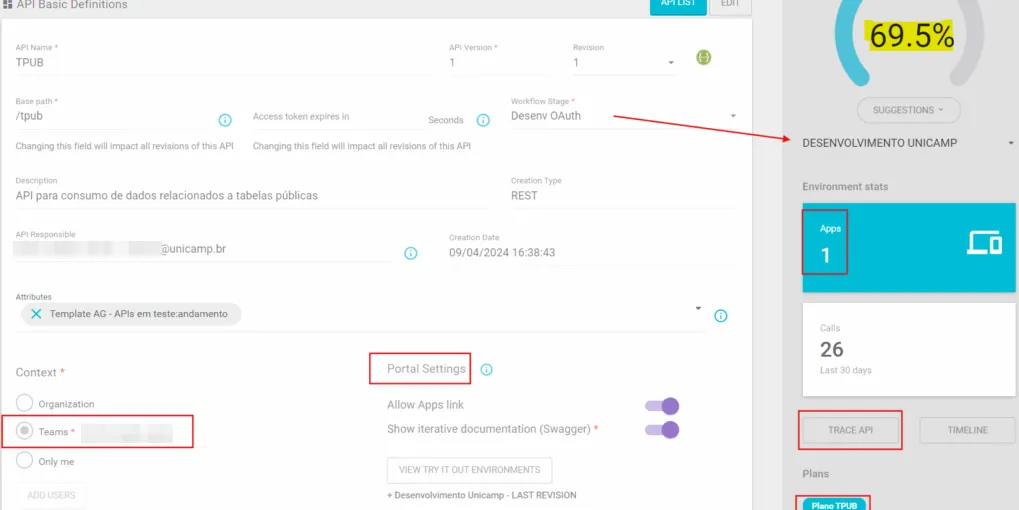
- Teams: Must always be associated with a team;
- Portal settings: controls publishing on the developer portal, where your API clients can access your SWAGGER documentation and have a first interaction with it via Try out;
- Plans and Apps: The API must always be associated with an App (who is the API client) and a Plan (usage restrictions).
- Interface Completeness: Percentage of completeness as per AG – Adaptive Governance;
- TRACE API: click this button to view calls and execution statuses, as well as logging (tab TRACE Gateway).
Environments
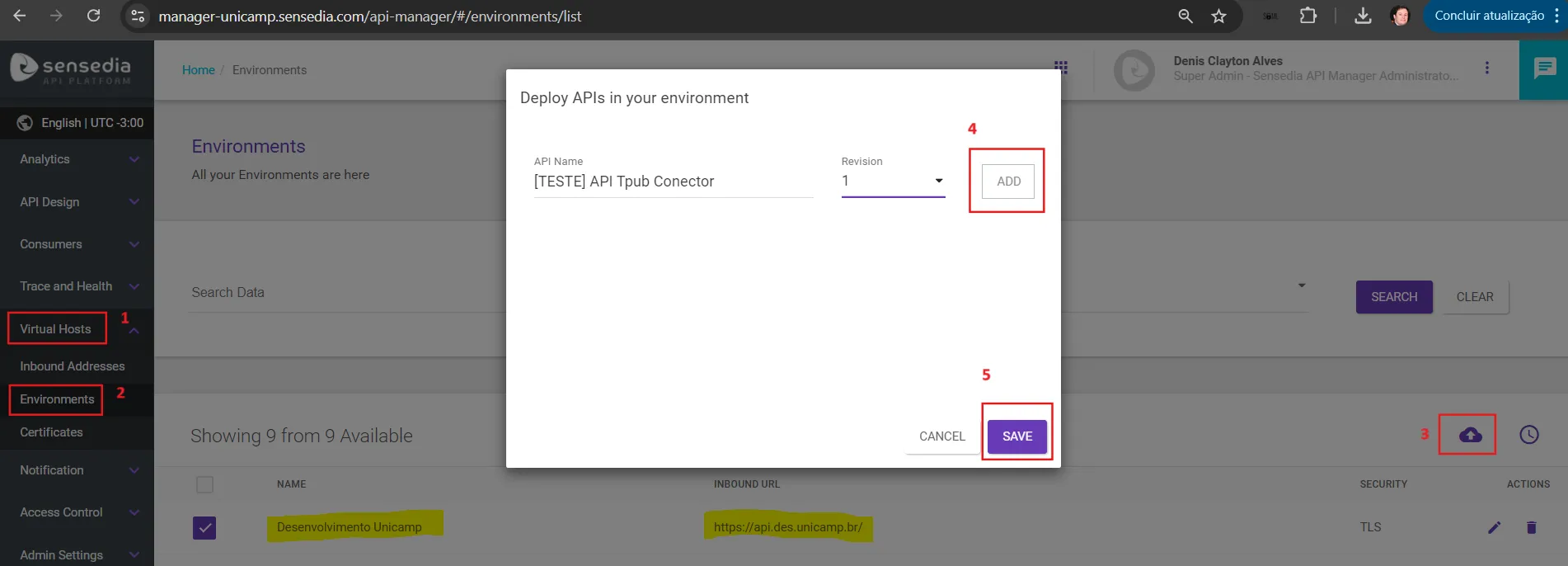
The available environments for deploying APIs are :
- api.des.unicamp.br (development)
- api.hom.unicamp.br (homologation)
- api.unicamp.br (production)
Steps for publishing:
Workflows, Stages and Best Practices
The following workflows/stages were created for API development following best practices :
- Stage One: workspace to start creating your API, without the premise of using interceptors and without a minimum percentage of completeness for your API.
- Sandbox:
- Interceptor requested:
- Log (in the Request, at any position of the execution and in any flow – resource or operation).
- API Maturity: 50% (API registration completeness).
- Interceptor requested:
- The development, approval, and production stages each have two possible uses, depending on the characteristics of your API.
- (A) If your API is for public consumption ☺️, that is, do not handle sensitive, personal data and do not work with confidential data, use the stages * Client ID Validation.
- The interceptor that gives this workflow its name will allow traceability of the consumption of this API, via its associated App and Plan.
- Without using this strategy, there will be no way to check who the API consumers were during the audit.
- This way you will go through the Workflow stages:
- Desenv Client Id Validation
- Homolog Client ID Validation
- Prod Client ID Validation
- (B) If your API works with confidential data, sensitive or personal 😨, then you should use the stages * OAuth to require eligible consumers of your API to clientID and secret necessary to release the use.
- This way you will go through the Workflow stages:
- OAuth Development
- OAuth homologation
- OAuth Prod
- These Internship impose the use of interceptors Bearer Token RFC6750 v2 e OAuth in your API.
- This way you will go through the Workflow stages:
- (A) If your API is for public consumption ☺️, that is, do not handle sensitive, personal data and do not work with confidential data, use the stages * Client ID Validation.
Below are the details of these stages.
- stage Development or Homolog Client Id Validation
- Interceptors required:
- Client ID Validation (in the Request, in any position and flow).
- Log (in Request, in any position and flow).
- API Maturity: 60% (API registration completeness).
- Interceptors required:
- stage Desenv or Homolog OAuth
- Interceptors required:
- Bearer Token RFC6750 v2 e OAuth (in the Request, in any position and flow).
- Log (in Request, in any position and flow).
- API Maturity: 60%
- Interceptors required:
- stage Prod Client Id Validation
- Equivalent to the homologation of the same name.
- Cannot use Mock Interceptor.
- API Maturity: 65%
- Prod OAuth stage
- Equivalent to the homologation of the same name.
- Cannot use Mock Interceptor.
- API Maturity: 65%

Error message if a required interceptor is not used :
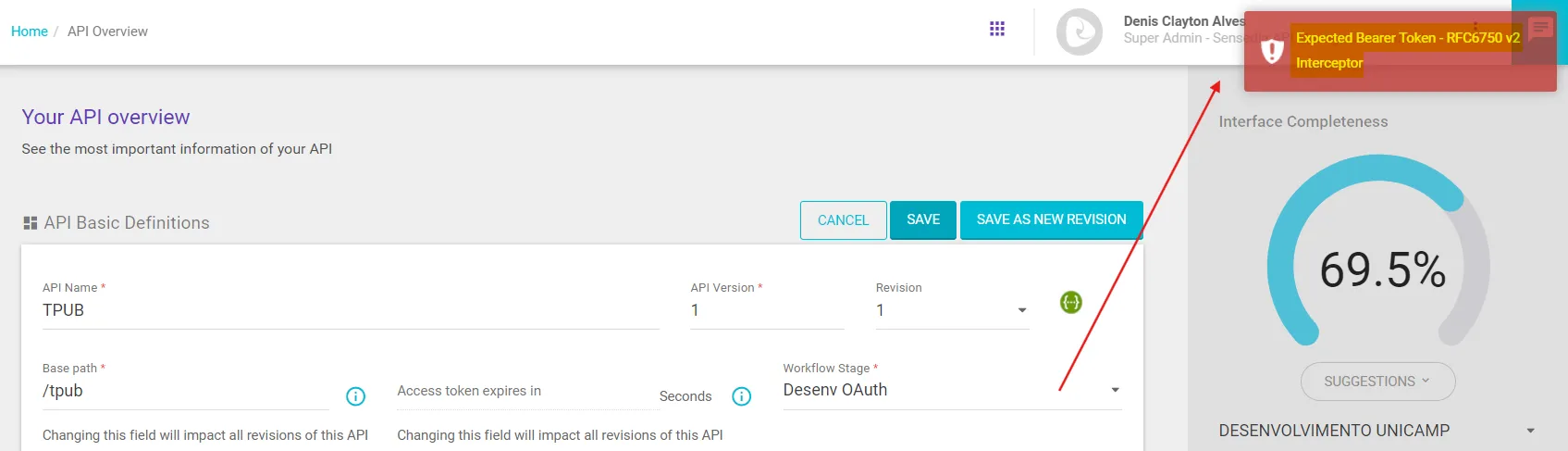
🔦 In some cases it is important to use your browser's Developer plugin F12 to get more details about the error message that the platform displays.
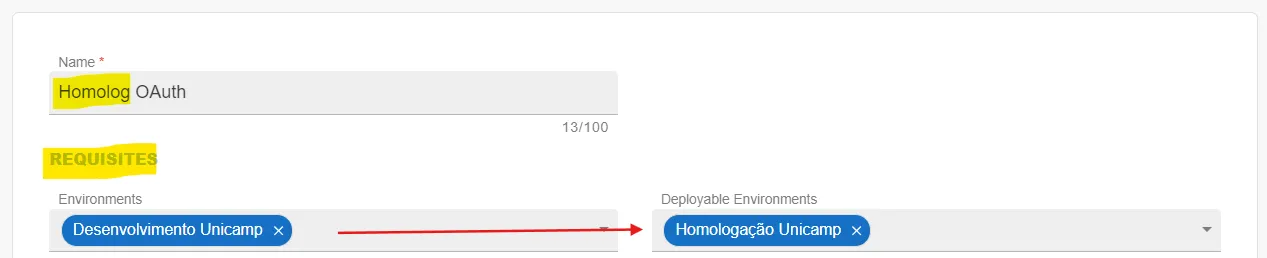
Correction:

Notes :
- By changing the training of your API for Dev (Client ID Validation ou OAuth), this should already be in the Sandbox stage;
- By changing the training from your API to Homolog (Client ID Validation ou OAuth), this must already be in both stage Development corresponding, as well as published in the Unicamp Development environment;
- By changing the training from your API to Prod (Client ID Validation ou OAuth), this should already be in the stage Homolog corresponding, as well as published in the Unicamp Homologation environment.
Example : The prerequisite for moving to the Homolog stage * is that the API must first be deployed in Unicamp Development.
Restrict API access to your endpoints (backend) to platform IPs only
- You can get these platform IPs from the resource below, please log in before accessing this URL:
- https://platform-production.sensedia.com/api-management/info/
- See IPs set to Outbound Address.
- ⚡ You must specify this ACL in your Kubernetes infrastructure, via Kubernetes Ingress Nginx allow list source range or in your VM's Proxy and firewall, as well as in the backend itself (WEB server).
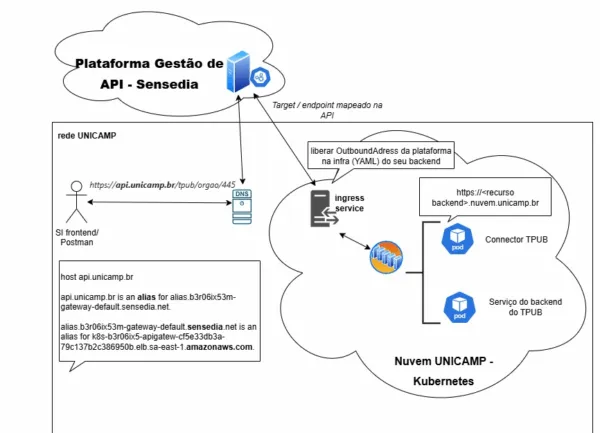
- The address api.unicamp.br is an alias in UNICAMP's DNS for the API Management Platform;
- It is also an environment registered on the platform, with an associated TLS/SSL certificate, with environment variables and APIs also associated with it.
- The platform for this API calls the target/endpoint from the platform's own outbound IPs (Outbound Address). These IPs (management/info) must be included in the white list of the Kubernetes Ingress service and other points, as previously explained.
- In the case of using platform connectors, in order to test their connectivity, it is necessary to release 2 specific IPs.
- Please request the plataforma-api-l@unicamp.br the relationship of IPs.
Security Interceptor Documentation
The remaining needs of your API should be addressed within its scope using the available interceptor palette , especially those related to API security.
Traffic interceptors that are important for mitigating DDoS attacks
The RATE LIMIT and SPIKE ARREST interceptor to block massive accesses from the same IP in a short space of time, for example.
And the PAYLOAD SIZE feature to avoid overloading request processing.
Connectors
API Manager provides connectors for integration with Databases, Cloud Providers, etc.
The idea is, for example, to convert the JDBC protocol into REST calls with the return of data encapsulated in JSON.
It is an interesting resource in case the business demand does not require the construction of a service (microservice or backend) to provide data.
However, the use of this resource should be done with great care 📏 observing the aspects mentioned in the next section . ‼️
Security and Resiliency Considerations for Providing APIs Using Connectors
- In the API that will be the client of the created connector:
- ⚡ Mandatory use of interceptors such as:
- SQL Threat Protection to sanitize data entry;
- XSS Threat Protection, as well as other interceptors to block attacks;
- In these interceptors, you can specify expressions to ignore. For example, some cities are called "ALTER," so for a city query, this expression could be set to ignore.
- Use interceptors Bearer Token e OAuth to restrict who can use your API and thus restrict access to data.
- ⚡ Consider using the cache interceptor if data volatility is low.
- ⚡ Mandatory use of interceptors such as:
- ⚡ In the API Plan that consumes this connector, use an interceptor RATE LIMIT to block massive access from the same IP in a short period of time, for example. And the resource payload size to avoid overloading request processing.
- ⚡ Take other precautions, such as not create a connector for your system's transactional base, if the queries can be for D-1 data (previous day).
- ⚡ Instead of queries run directly on the tables, use views that expose only the columns and records required for the scope of the API.
- ⚡ If the API is only for data querying, specify a database user in the connector with read-only permissions to the database. Ideally, this should be a database user exclusively for APIs in the same context.
- ⚡ Allow only IPs from Gateway Outbound from Sensedia (see the management/info URL) can access the connector resource (Java or container).
- ⚡ Add the Connector IP (Java or container) to the ACL of the database that will provide the data.
- ⚡ Use container/docker deployment to have high connector availability, instead of the Java/Jar option. This way, you can configure a connector cluster (Kubernetes Auto-Scaling) instead of a single connector and avoid an SPF (Single point of failure).
Consult the documentation for this resource here .
In this documentation, Sensedia – API Patterns v2.2 – Practical Guide , pages 17 and 18 address an important topic related to pagination of data returned by the connector.